Just posting this for absolutely my own benefit. I recorded it somewhere before but I keep misplacing the information. 🙃
[2024.01.20]: Initial post
[2024.09.23 update]: Instructions on updating CUDA from 11.7.89 to 12.6.65
[2024.12.31 update]: If your Python version is 3.9.x, you’ll need CUDA = 12.1; if your Python version is 3.10.x, you’ll need CUDA >=12.4
[2025.04.17 update]: Updated installation instructions with PyTorch deprecating its official Anaconda channel
[2024.01.20]: Initial post
Every time I create a Python virtual environment (GitHub – raidenworks/create_virtual_env: Windows batch file for quickly creating python virtual environment) for segregating projects and their package dependencies, and where the project would benefit from having training or inference be run through the GPU, I find I have to dig for information on installing torch in the environment. It involves a fair bit of research and I’m just logging here what I’ve done most recently. (I’m running Windows 10 with a RTX 2080.)
This assumes:
- CUDA is already installed. (https://docs.nvidia.com/cuda/cuda-installation-guide-microsoft-windows/index.html)
- Fresh virtual environment is already created.
A check shows CUDA is installed:
!nvcc --version

But not available:
import torch
torch.cuda.is_available()

Specifically for my CUDA version, this is my install command (after faffing around looking at https://pytorch.org/get-started/previous-versions/ and working through the below):
pip install torch==2.0.1+cu117 torchvision==0.15.2+cu117 torchaudio==2.0.2+cu117 --extra-index-url https://download.pytorch.org/whl/cu117

In the above, we see the installation is using the previously downloaded and cached Python Wheel (.whl) for torch==2.0.1+cu117. I had previously run the pip install with deprecated versions for torchvision and torchaudio and it caused the installation to just stop after torch was downloaded.
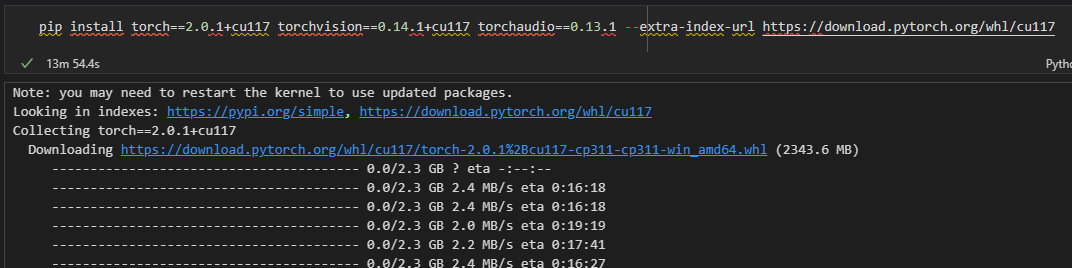


Re-running it again gave this:

Which nicely shows the error message for the torchvision version not buried in the middle of the extensively long torch Python Wheel download status seen in the prior pip install. Just pick the highest version number with +cu117, 0.15.0+cu117, and similarly for torchaudio too, which was 2.0.2+cu117.
The total time should take around 24 minutes, with the bulk of data from the 2.3 GB torch package. Something to note if you have limited space for additional virtual environments.
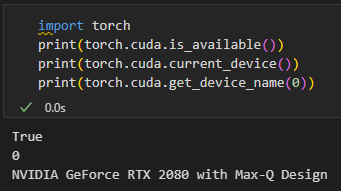
Net result:
[2024.09.23 update]: Instructions on updating CUDA from 11.7.89 to 12.6.65
1. Updated my NVIDIA CUDA drivers to the latest ones (11.7.89 to 12.6.65) via the “NVIDIA GeForce Experience” app (couldn’t do it through the “NVIDIA Control Panel” app):


2. Downloaded and ran the latest NVIDIA CUDA Toolkit 12.6.1 (https://developer.nvidia.com/cuda-downloads):

3. Installed the pytorch libraries (https://pytorch.org/get-started/locally/):

I use Mamba as a drop-in replacement for Conda installer (it’s faster and with better package resolution):
mamba install pytorch torchvision torchaudio pytorch-cuda=12.4 -c pytorch -c nvidia
Only this line needs to be run for every new Conda environment that needs CUDA.
[2024.12.31 update]: If your Python version is 3.9.x, you’ll need CUDA = 12.1; if your Python version is 3.10.x, you’ll need CUDA >=12.4
In your Conda-activated terminal, to see salient information quickly, run this:
python -c "import sys; import torch; print('Python version:', sys.version); print('PyTorch version:', torch.__version__); print('CUDA version in PyTorch:', torch.version.cuda); print('Is CUDA available:', torch.cuda.is_available())"
Example where CUDA is not available:

Example where CUDA is available:

Be aware that if your environment’s Python version is 3.9.x, you should be installing pytorch-cuda=12.1 with this command:
conda install pytorch torchvision torchaudio pytorch-cuda=12.1 -c pytorch -c nvidia
If it’s Python version 3.10.0x, you can install pytorch-cuda=12.4 with this command:
conda install pytorch torchvision torchaudio pytorch-cuda=12.4 -c pytorch -c nvidia
Below we see with pytorch-cuda=12.1 installed in a environment with Python 3.9.21, CUDA becomes available:

[2025.04.17 update]: Updated installation instructions with PyTorch deprecating its official Anaconda channel
https://github.com/pytorch/pytorch/issues/138506

https://pytorch.org/get-started/locally/
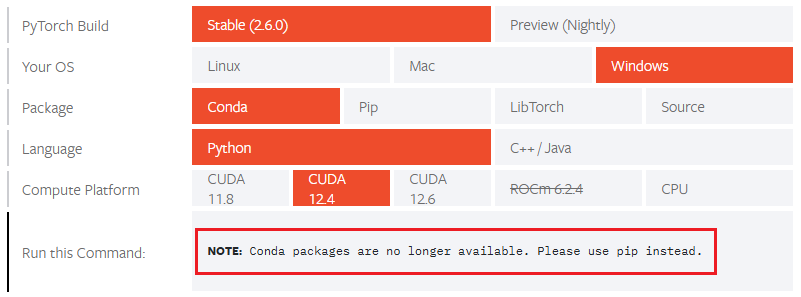
The previous command to install pytorch-cuda=12.4 no longer works, it will install PyTorch with CPU processing only:
mamba install pytorch torchvision torchaudio pytorch-cuda=12.4 -c pytorch -c nvidia
The outcome is also the same if searching the nvidia channel first:
mamba install pytorch torchvision torchaudio pytorch-cuda=12.4 -c nvidia -c pytorch
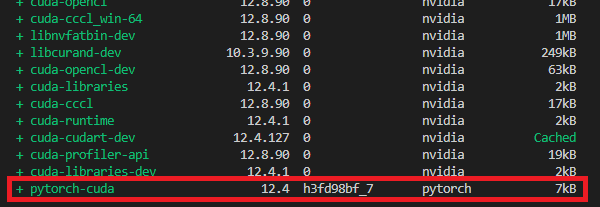
🠉 Seeing the above installation logs, even though it appears to still ‘locate’ it at the pytorch channel, it’s simply not available once the installation completes:
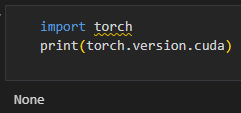
If you must use conda/mamba install, specify the conda-forge channel instead:
mamba install pytorch torchvision torchaudio -c conda-forge
(This will install both pytorch and CUDA-enabled pytorch with its _latest_ version, 12.6 as of 2025.04.17)
If a specific CUDA version is required, you’ll have to find the pytorch build that has CUDA enabled with it. The conda-forge channel does not have the pytorch-cuda package and the following command naturally does not work:
mamba install pytorch torchvision torchaudio pytorch-cuda=12.4 -c nvidia -c conda-forge

It’s just simpler to use the supported pip install:

pip install torch torchvision torchaudio --index-url https://download.pytorch.org/whl/cu124

No more mamba/minimamba install. Boo.
Addendum 1 – 2025.04.17:
If you need to pip install other packages and are thinking to do everything on one line like:
pip install torch torchvision torchaudio diffusers transformers accelerate peft safetensors xformers --index-url https://download.pytorch.org/whl/cu124
Don’t. The special index URL (https://download.pytorch.org/whl/cu124) should only apply to torch-related packages — if you apply it globally, pip might fail to find the rest (like diffusers) since they’re hosted on PyPI.
Run them sequentially:
pip install torch torchvision torchaudio --index-url https://download.pytorch.org/whl/cu124
pip install diffusers transformers accelerate peft safetensors xformers
Or put an && operator in-between:
pip install torch torchvision torchaudio --index-url https://download.pytorch.org/whl/cu124 && pip install diffusers transformers accelerate peft safetensors xformers
Addendum 2 – 2025.04.23:
To include the torch, torchvision, torchaudio packages into a requirements.txt, use the --extra-index-url parameter. This adds the PyTorch CUDA-specific index in addition to PyPI. If you use --index-url instead of --extra-index-url, it replaces PyPI entirely, which will likely break other dependencies.
# Use PyTorch CUDA 12.4 index for the following packages
--extra-index-url https://download.pytorch.org/whl/cu124
torch
torchvision
torchaudio

diffusers
transformers
accelerate
peft
safetensors
xformers
I would presume you could run a single line in the terminal like:
pip install torch torchvision torchaudio --extra-index-url https://download.pytorch.org/whl/cu124 diffusers transformers accelerate peft safetensors xformers
but I haven’t tested it. I’d generally like to confirm that torch with CUDA is available first before wasting time installing the rest of the packages so it’s probably better to install it sequentially still.
Addendum 3 – 2025.04.24:
Woah, it’s only been a week since 2024.04.17 and the default pre-compiled binaries (wheels) are now 11.8, 12.6 and 12.8. 12.4 is still installable but I imagine it will be taken offline at some point. PyTorch version also updated to 2.7.0. Update your scripts accordingly.
https://pytorch.org/get-started/locally/


 RaidenWorks
Discussion
No comments yet.